Pages

Showing posts with label linked in. Show all posts

Friday, March 6, 2015

Utilize Your Spring Break


If you are not spending your spring break tanning on the beach, you can use this time to dive straight into getting ahead on your job searching. From the comfort of your bed, you can be incredibly productive. Spend your break wisely by following a few of the following suggestions:

· Build and polish your LinkedIn profile: use this time to update all your information, join relevant groups, and network with alumni in a field of your interest. Make sure you have a professional headshot!

· Schedule an informational interview: you can use this time to determine what job would be best for you. Arrange to meet with a professional in your field to gain valuable insight by having questions prepared. Ask them what a typical day on the job is like, what their work environment is like, and about the path they took to get there.

· Try shadowing a professional: contact a professional in your field and request to shadow them for a day. You will be able to see what a day in their shoes is like and if you would enjoy the work they do. It is important to contact them ahead of time to work into their schedule.

· Start researching: while you’re relaxing at home, this is a great time to start compiling research on prospective employers. Create a comprehensive list for companies or employment opportunities that you are considering applying to; include application deadlines, application requirements, salaries, and even a pros and cons list.

· Go over your resume: check to see when the last time your resume has been updated. Ask several different people who don’t know you that well to glance over your resume. It’s important to keep your resume continuously updated and that each version is tailored for every position you apply for.


Tuesday, February 17, 2015

Job Search Gone Cold? 7 ways to warm up!


We finally got our first big snow of 2015 and we’re in for a frigid week. While it’s cold outside, use this time to warm up your job search. Here are 6 warm ups for you with a bonus recipe thrown in!

Want to move to a different part of the country? Check out CareerSHIFT where you can customize your search for listings targeting a certain job title or location. And, if you have a dream employer but no contacts, you can search for contacts at employers as well. Once you locate an employer, send that contact a letter of inquiry with your resume.


Attend career fairs. Next week the Computer Science Consortium, Connection and CareerFest fairs will all be held. Connection is for ALL majors. And, if you don’t already have Spring Break plans, there are career fairs in Richmond and Northern Virginia during our break. Find out more about various fairs here.


Ramp up your brand online by fine tuning your LinkedIn profile. The more complete your profile, the more LinkedIn can help you, and the more you will bubble up in searches. Tap into a special job search site LinkedIn has created just for you. And, FIND ALUMNI by accessing them under CONNECTIONS in the LinkedIn tool bar. Tailor your requests to connect with alumni.


Make Hokies4Hire a regular part of your search by setting up saved searches (a job search agent), so you will get emails when a new job is added that meets your criteria. You can also participate in on campus interviews and look for contacts in the Employer Directory in Hokies4Hire.


Use GoinGlobal to research a city where you plan to relocate. This site features over 40 US City Guides with links to job listing sites. Tap into professional networking groups for a particular city and learn about top industries. And, if you are an international student, access the H1B Plus database to find employers who have been through the H1B process with other employees.


Put yourself out there! Don’t be afraid to reach out to contacts through friends of parents or parents of friends. Maybe that contact is a neighbor, someone you met at a conference, someone you know from class. Most people like helping others. If you find someone who won’t assist you, move on to the next contact. As I tell the 2 Hokies I raised, 

“It  never hurts to ask. The worst answer you will get is no!”

Need more ideas to warm up your job search? Come see us in Career Services or at a location near you. To make an appointment with a career advisor, call 540-231-6241. We can help you heat up your job search!


To close, warm up for real with this homemade hot chocolate recipe from the Hershey Cocoa box. Nothing like HOMEMADE HOT COCOA to warm up on these cold days we’ve been having. Stay warm and try some of these tips to make your job search heat up!


Monday, December 29, 2014

Be the pilot of your job search: An Infographic

This morning as I was watching CBS This Morning, the anchors were discussing a missing AirAsia plane. An expert from the National Safety Council joined in their discussion. As she spoke, she shared that the pilots of that plane had 3 key jobs:

Aviate
Navigate
Communicate

These same 3 actions can be applied to a journey you may be preparing for, your job search. View our infographic below for tips on how to be the pilot of your job search.

Bon voyage, and let us know if we can help during any stage of your journey.


Thursday, December 19, 2013

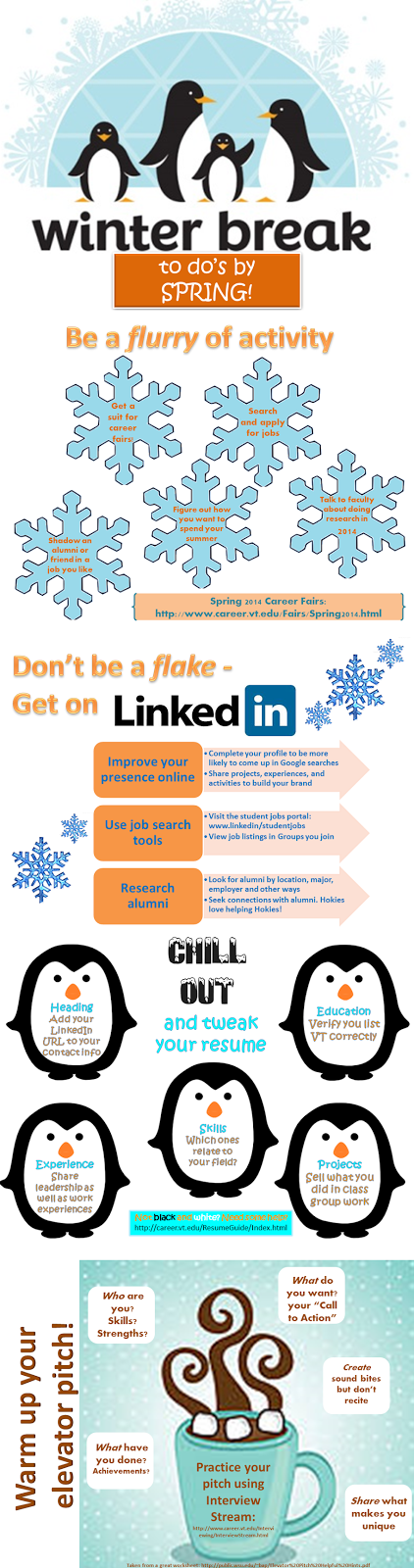
Warm up for Spring 2014: Do these during Winter Break!

Now that finals are behind you, we hope you take some time for yourself to be with friends and family. Have a safe trip to your destination. After you relax, though, prepare for a busy Spring 2014 with these tips:


Friday, October 4, 2013

Feelin' the "California Love?" 5 Ways to Find a Job in CA (or wherever you want to be)


California Love - Does 2Pac's song have you itchin' to move to sunny California? If you plan to leave these Southwest Virginia mountains and go work out West, Career Services can help you reach your destination, wherever it may be. These five resources should have you feelin' the California Love by your graduation.

1. With Career Shift, you can target your job search for exactly what you are seeking exactly where you want to be. For example, in a recent search, I found 64 marketing jobs at one company, Google, in California. You can also use this resource to find contacts. Using the same example, I found over 1500 contacts for Google in the Golden State.

2. Going Global has over 40 US City Guides, where the CA lover could tap into four guides for Los Angeles, San Diego, San Jose, and San Francisco. Each of these city guides provides information on top employers, professional and social networking groups, job listing resources, and a city overview. If you are an international student, each city guide also provides a list of H1B employers that is pulled from data provided by the US Department of Labor. Going Global also has a database called H1B Plus, which is a helpful resource for international students seeking to stay in the US to work.

3. In LinkedIn, if you click on Network on the menu bar, you can then access Find Alumni, to look for alumni by location, employer or function. As a Pamplin graduate, I found 188 alums in the San Francisco Bay area and 135 in the Los Angeles area. Going along with the example in #1 above, I also found 7 alums who work for Google and 776 alums in marketing. Hokies love helping Hokies, so this is a great tool to use.

4. Another way to reach out to alumni is through Alumni Chapters where these groups of alumni exist all over the world. Some chapters have their own career fairs, and most have regularly scheduled networking events. In CA, there are 5 chapters. You can't hope for a better person to help you with your job search than another Hokie.

5. Visit career center web sites at colleges or universities in CA or near a location where you want to live. Also be sure to visit the web site for a major similar to your major at those schools as well. I visited UC-Berkeley's site and found 5 top job listings mentioned for each week. Even though I couldn't get into their Callisto site like our Hokies4Hire site to get more specific information about those jobs, I could search for a job that was mentioned on a company's web site.

Using these tools should help you get to California by graduation with a job nailed down, ready to feel the "California Love." What questions do you still have about finding a job in a specific location? Share your questions with us, or make an appointment with a Career Advisor by calling 540-231-6241.

Thursday, September 19, 2013

The Career Fair is Over. What’s Next? Job Search 5.0


Resume: Check. Elevator Pitch: Check. Career Fair: Check.
Now what? "Job Search 5.0" Top 5 steps after the career fair.

5. Career Fairs are not the only way to find a job - use other resources too. The number one way to find a job is through personal contacts. If you need to grow your network and improve your online professional image, get on LinkedIn.com. You can connect with alumni and others and search for jobs in LinkedIn too. Some other job search resources to tap into are Hokies4Hire, Career Shift and Going Global, all linked on the Career Services web site.

4. Treat your job search like a 3-credit class. After logging some hours preparing for a career fair, don’t let up now. Looking for a job can seem overwhelming. To break up this monumental task, carve out some time each week to work on your job search.

3. Prepare for interviews. Get ready for interviews by practicing responses to questions  and deciding on questions you would ask in an interview. If you need to practice your skills at interviewing, sign up for a mock interview or visit Interview Stream.

2. Research salary requirements. One of the more difficult questions an employer can ask during an interview is one about your salary expectations. To be prepared for salary questions, do your research. Visit the Post-Graduate report to find out the median salary for your major. Link to Salary.com to search for a salary for a certain job at a particular location. Check out glassdoor.com for salary information for a particular company. Visit paycheckcity.com to figure out what your take-home pay would look like when you receive an offer. Come up with an acceptable range to quote to an employer if you get asked the dreaded question about salary. Need help evaluating an offer? Make an appointment with a career advisor in Career Services by calling 540-231-6241.

And, the number one step to take after a career fair is... 
1. Follow up and follow through. Be sure to enter your information online for those employers you met at the fair or follow the other instructions they gave you. A couple of weeks after the fair, call the employer to check on the status of your application. Ask what the timeline is for the position to be filled and if there is anything else you need to do to be considered for an interview. Send the employer a follow up email, thanking them for talking to you at the fair, and reminding them how your background and experience fit their opportunity. Review previous posts linked here if you want to know more about thank you's and follow up. The saying in the graphic below is so very true...follow up can be a difference maker.


Monday, July 15, 2013

LinkedIn and Your Job Search: Easy as π


After you set up your profile and start networking using LinkedIn, the site is a useful job search tool in even more ways. How? It’s as easy as “Ï€.” Here are 3.14 tips for job search using LinkedIn.


Go ahead. Hit the “Easy button” and make your job search "easy as Ï€" by using LinkedIn. If these tips help you find your job using LinkedIn, let me know--maybe we can celebrate with a slice of pie! What questions do you have about LinkedIn and your job search?

Tuesday, July 9, 2013

Networking on LinkedIn

Last week we saw a great crash course on why you should be on linkedin.com.

I won't go over the basics again, but I will cover one important topic today: networking.

Many students don't think they have an actual network, or at least not a big enough one to "really count".  Networking is something for the "professionals".

I'm here to tell you that your network is a lot bigger than you think!


The Ripple Effect

Lets jump back into middle school English for a moment here and make a simile: your network is like a ripple effect.  You, dear reader, are the tiny droplet in the middle.  The first ring is your immediate contacts whom you know- friends, the manager at the restaurant where you might have waited tables one summer, a professor you took three classes from and really get along with, maybe even a second cousin or two.  The second ring is everyone in their immediate network.  The third ring would be the second ring's immediate network and so on.

So what's so great about having a connection that possibly reaches your neighbor's cousin's second son?  If, hypothetically, you wrote in your personal summary (that was talked about in last week's post) that you would love to work for a big wig animation studio and your neighbor visited your profile and saw it, they might remember that one cousin who has a kid who works at that one studio.  In general, people are usually pretty willing to help out.  If that neighbor mentions their contact with you and you follow up in introducing yourself to that contact and establishing a friendly relationship...well, who knows?  Maybe you'll be the next person putting the VT logo in a movie.


The First Contact

Continuing with this hypothetical neighbor and neighbor's cousin's second son, let's pretend your neighbor is willing to put you in contact with this animator.  Sometimes they will send the initial message for you, introducing who you are and what you're interested in.  This way, you get spoon fed your initial "in" and the pressure is taken off your shoulders.  However, sometimes they will give you an email and you will have to make the first contact yourself.

First off, I like to email people before I send them a connect request on LinkedIn.  You might not know if your neighbor has introduced or mentioned you beforehand, and getting a random LinkedIn request from a stranger can sometimes be a little off-putting.  No need to scare them right off the bat.

In this email, make sure you introduce yourself and explain why you are reaching out to this person first and foremost before you ramble.  You're probably overloaded with questions about what their job entails and what you can do to boost your resume and portfolio, but you don't want to drown the receiver in a sea of confusing and interweaving ideas and questions.  Make your point heard, then branch off.

Lastly, make sure you reread and reread this email again!  You want a friendly yet professional tone.  This means you need to pay attention to not only proper grammar and spelling, but word choice.  Make sure you are saying exactly what you want to say exactly the way you want to say it.  Once you click the send button, it's out of your hands.

 After you've made that initial contact and they have responded, you should send a connect request on LinkedIn.  By this point, your profile should have all the information someone could find on your resume, so your new contact can browse it to see what you know and maybe even refer you to a few other contacts! 

Many business have their information on LinkedIn.  On their page might be the company website URL, a list of the employees who have LinkedIn profiles, and possibly even job listings. 


Don't forget - you can network out of LinkedIn as well!

As I finish off this article, I want to remind people there is a world outside the internet!
Shocking, I know.
Trying to be more proactive about making more contacts without waiting for the ripples can be a little difficult on LinkedIn.  You cannot send direct messages with people not already in your network without both of you having an upgraded account.  Not everyone has an email listed on their profile.  Sending connection requests with only a short note to explain why you're reaching out can result in your request being rejected.  It's not impossible, but there are more ways to reach out.  There's no harm in networking in person and bringing your new contacts to LinkedIn!

LinkedIn does not have to be your only means of networking.  Career fairs, conferences, and university clubs are also great ways to get yourself out there, meet new people, and extend your network.  So keep a look out for other opportunities!

Tuesday, July 2, 2013

Your LinkedIn Profile: Resume with a Twist


Why should you be on LinkedIn.com? This site is the destination for you
  • to ensure you have a professional online presence; 85% of employers say that a positive online presence influences their hiring decisions.
  • to network with alumni and colleagues in careers of interest; 70% of jobs are found through networking. LinkedIn is the largest professional network with over 175 million members. And,
  • to use as a tool in your job search. A 2012 Jobvite survey found that 93% of recruiters used LinkedIn as a tool for locating potential hires.
Like Facebook, to get started, you need to populate your Profile. Unlike Facebook, your LinkedIn Profile resembles your resume, with a twist. First, let’s talk about some of the typical parts of your resume to share in Linkedin, then we’ll talk about some twists in LinkedIn.
Your Resume and LinkedIn
For entry level positions, we recommend using an objective on your resume. In LinkedIn, this takes the form of a headline where you mention an area of study, and/or career ambitions. Who are you and what are you looking for? Your headline is the tagline for your personal brand. I really like this headline that was shared in a Forbes article on LinkedIn headlines: “Copywriter who knows how to craft web content that goes viral. Oh, and you’ll never beat me at Scrabble.” After reading the article, I revised my own headline!

In your Profile, also include typical categories of information you find on a resume: Education, Experience, Skills and Expertise, Honors and Awards. If you are just getting started with these, visit this site for more tips on what to include. If you already have a resume, you can upload your resume to start building your Profile.
The Twists

There are several items to add to your LinkedIn Profile that are not typical entry-level resume material:
Photo. No, you don’t want to use that picture of you cheering on the Hokies at the VT-Rutgers Bowl game that you used as your Facebook profile photo. A professional headshot is preferred for your LinkedIn Profile photo.
Summary. Write a summary that describes your skills and experiences.  Talk about skills you’ve gained in the classroom or from internships or soft skills gained from part-time jobs, like communication or time management. If you’ve written a cover letter, pull some of your text from that email for your summary. You can also use your elevator pitch as your summary. Don’t have one? Craft one here.
Recommendations. Although references are part of the job search, they are usually not listed in the resume, but in a separate document. However, in your LinkedIn Profile, you want to ask several people whom you would use as a reference to provide recommendations for you in LinkedIn. These could come from supervisors, professors, or advisors – people who can attest to your performance.

LinkedIn URL: As you are completing your Profile, make sure that you set up your LinkedIn URL as one recognizable with your name. After you create your URL, add this link to your email signature and to the contact information in your resume.
For more tips about getting started with LinkedIn, watch these videos. What questions do you have about your LinkedIn Profile? In our next post, we’ll share advice about networking using LinkedIn.

Friday, June 28, 2013

2013 Grads Still Looking for a job?


Are you a recent graduate? In 5 minutes or less, view this helpful presentation full of  tips as you look for a job.

Not on LinkedIn.com yet? Watch for a new post with tips for creating a LinkedIn profile coming soon!